Hoarding booking software keeps every outdoor site in one place and shows, at any moment, which dates are free, held or booked. With it, a sales person can answer "Is this site free next month?" in seconds, send a proposal with only free sites, and never book the same site twice. It also tracks what happens after the booking: printing, mounting, proof of display and the margin on each campaign.
The question that costs agencies the most
A client calls: "I need 10 sites on the main road for next month. Which ones are free?"
In many agencies, the answer starts with a search through a spreadsheet, a few phone calls and a WhatsApp message to the operations team. By the time the list is ready, the client has asked someone else. Or worse, a site is offered that another sales person already promised to a different client.
The problem is not effort. The problem is that sales, planning, operations and accounts do not look at the same list.
5 signs your agency needs a proper booking system
1. Availability lives in spreadsheets and phone calls
Each sales person keeps their own copy. One update is missed, and a site is either double booked or stays empty because nobody knew it was free.
2. Holds never expire
A site is "held" for a client who is still deciding. Two weeks later, it is still held, the client has gone quiet, and the site earned nothing. Every hold needs an expiry date.
3. A proposal takes two or three days
Planners collect site photos, sizes, rates and dates by hand for every enquiry. A system that already has all of this can build the proposal in minutes.
4. Proof of display is chased on WhatsApp
Mounting photos sit on the field team's phones. Putting together a campaign report takes days, and the client keeps calling for updates.
5. You learn the real margin after the campaign
Media cost, printing and mounting are tracked in different places, so nobody knows the profit on a campaign until it is over.
What to record for every site
Good hoarding booking software starts with a clean site master. For each site, record:
- Site code, city, area and landmark
- Location on the map
- Media type: hoarding, billboard, LED screen, bus shelter, transit
- Size, facing direction and lighting (lit or non-lit)
- Photos, day and night
- Rate card and minimum booking period
- Owned site or partner (media owner) site, with the buying cost
- Licence or permission renewal date
Once every site is in one list, availability becomes a simple calendar instead of a guess.
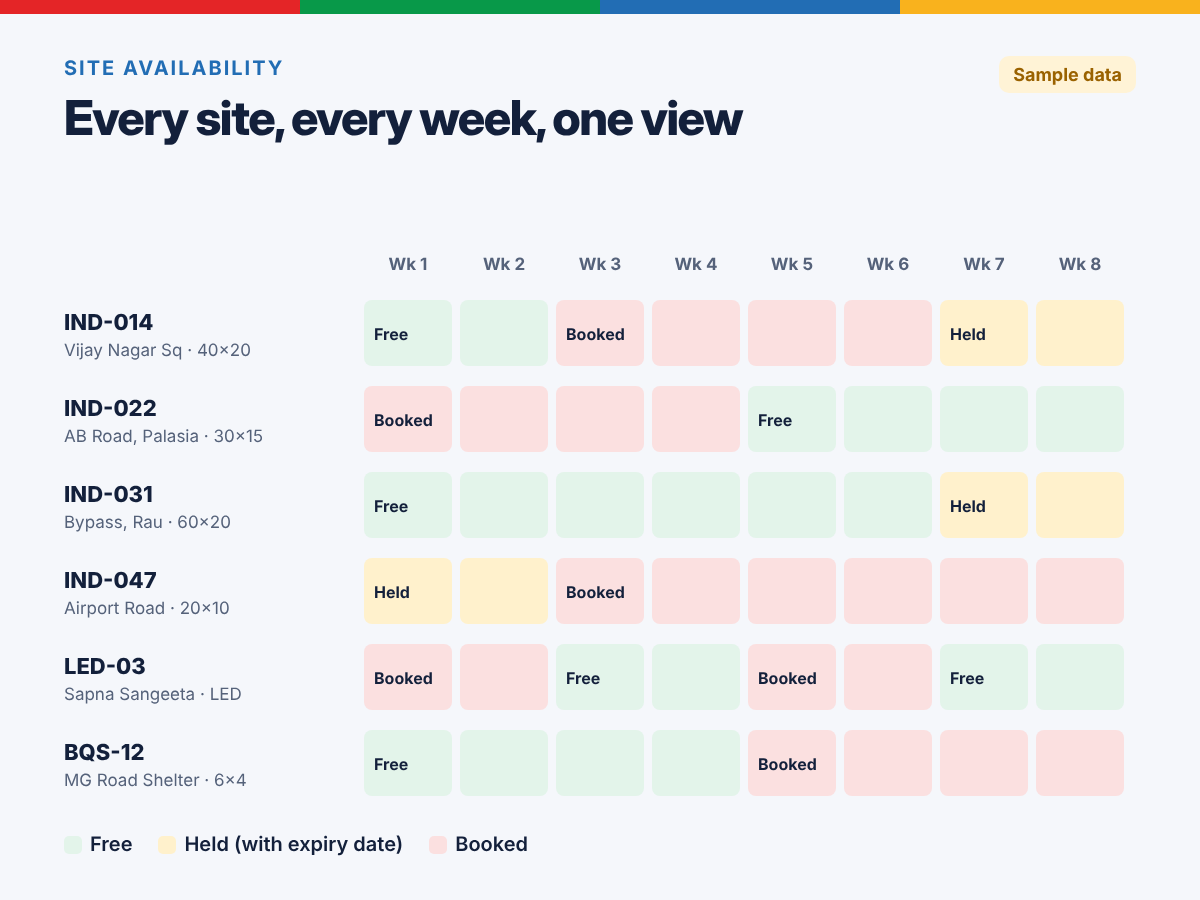
Sample layout with example data. Free, held and booked dates for each site, in one view.
How a booking should flow
- Enquiry: the client's brief, budget, city and dates are recorded once.
- Search: the planner filters free sites by city, size, lighting and dates, on a list or a map.
- Hold: chosen sites are held for the client with an expiry date.
- Proposal: the media plan is built from the site master, with photos, sizes and rates already in place.
- Booking: when the client confirms, held sites become booked. They cannot be offered to anyone else for those dates.
- Mounting and proof: the field team uploads photos with date and time from a mobile app.
- Report and invoice: the campaign report shows proof site by site, and the invoice goes out on time.
- Renewal: before the campaign ends, sales gets a reminder to offer a renewal.
A checklist for choosing hoarding booking software
- Does it show free, held and booked dates for every site in one view?
- Do holds expire on their own?
- Can planners search free sites by city, size and lighting, and on a map?
- Can it build a proposal or media plan from the site master?
- Can the field team upload proof of display photos from a phone, with date and time?
- Can clients see their own campaign online, if you want that?
- Does it track media owner costs, so you see margin before you book?
- Does it remind you about licence renewals and campaign end dates?
- Can it work with LED screen slots and transit media, not only hoardings?
- Can it change to fit your rate rules and approval steps, instead of forcing a fixed template?
How outdoor agencies do this on Zoho
On Zoho, an outdoor advertising agency usually starts with three connected apps:
- Zoho Creator for the site master, the availability calendar, holds, bookings, media plans and the field team's mobile app for proof of display.
- Zoho CRM for enquiries, client accounts, campaign briefs, proposals and follow-ups.
- Zoho Books for client invoices and media owner bills.
It is not a ready-made product. We build it around your sites, your rate cards and your approval rules, and switch on only the parts you need first. See the full flow on our Zoho for outdoor advertising agencies page.
Frequently asked questions
What is hoarding booking software?
Hoarding booking software keeps every outdoor site in one list with its size, location, photos and rates, and shows which dates are free, held or booked. Sales can then send proposals with only free sites, and no site gets booked twice.
How do outdoor advertising agencies stop double bookings?
By keeping one live availability calendar for all sites, and giving every hold an expiry date. When a hold expires, the site becomes free again on its own, and a site that is booked cannot be booked again for the same dates.
Can Zoho be used as hoarding booking software?
Yes. A site master and availability calendar can be built in Zoho Creator, with Zoho CRM for enquiries and proposals and Zoho Books for invoices. Field staff can upload proof of display photos with date and time from the Zoho Creator mobile app.
Does this work for LED screens and transit media too?
Yes. LED screen slots, bus and metro branding, and bus shelters can be tracked the same way as hoardings: each one is a site or slot with its own dates, rates and proof.