Zoho Mail for business gives your team email on your own domain, like name@yourcompany.com, with no ads, on web and mobile. This guide explains the plans in simple words, what to check before you switch, how the setup works, and how to move from Gmail or Outlook without losing a single email.
If you are still deciding whether to switch at all, read our earlier post: Why choose Zoho Workplace over Gmail or Outlook? This post is the next step: which plan, and how to do it.
Zoho Mail plans in simple words
These details are from Zoho's official pricing page, checked on 2 November 2026. Zoho changes plans and prices from time to time, and prices differ by country, so always check the Zoho Mail pricing page or ask us for the latest price before you buy.
| Plan | Mail storage per user | Attachment size | Good for |
|---|---|---|---|
| Mail Free | 5 GB | Not listed | Up to 5 users on 1 domain, web and mobile apps only (no IMAP, POP or ActiveSync) |
| Mail Lite | 5 GB or 10 GB (two options) | 30 MB (large files up to 250 MB) | Teams that mainly need business email |
| Mail Premium | 50 GB + 50 GB retention | 40 MB (large files up to 1 GB) | Teams that must keep old email safe for a long time |
| Workplace Standard | 30 GB | 30 MB (large files up to 500 MB) | Email plus team chat, file sharing and meetings |
| Workplace Professional | 100 GB + 100 GB retention | 40 MB (large files up to 1 GB) | Bigger teams that need more storage and control |
Paid plans are billed per user, per year. Zoho offers a 15-day free trial on its paid plans, and the pricing page says no credit card is needed.
Which plan should you pick?
- 5 people or fewer, only need email on the web and phone: start with the free plan. Move to a paid plan when you need Outlook, more storage or a 6th user.
- Sales and accounts teams that only need email: Mail Lite.
- You must keep old email for audits or disputes: Mail Premium.
- You also want team chat, shared folders and video calls: Zoho Workplace Standard or Professional, so you do not pay for separate tools.
5 checks before you switch
- Who controls your domain? You need the login of the place where your domain was bought (GoDaddy, Hostinger, BigRock and so on) to change DNS records.
- How many people need a mailbox? Count real people. Shared addresses like sales@ or info@ can often be groups or aliases, not paid users.
- How many years of old email do you need? Moving 10 years of mail takes longer than moving 1 year. Decide before you start.
- Shared inboxes: list every common address (sales@, support@, accounts@) and who should receive its mail.
- Calendar, contacts and phones: plan who needs the mobile app and whether old calendars and contacts must move too.
How Zoho Mail setup works
- Add and verify your domain in the Zoho Mail admin panel.
- Create users, groups and aliases (for example sales@ as a group that reaches 3 people).
- Add the email security records SPF, DKIM and DMARC in your domain's DNS. These help your mail reach the inbox and not the spam folder.
- Move old data (emails, contacts, calendars).
- Switch the MX records to Zoho, so new mail starts arriving in Zoho Mail.
- Set up apps and train the team: web, mobile app, signatures and two-step login.
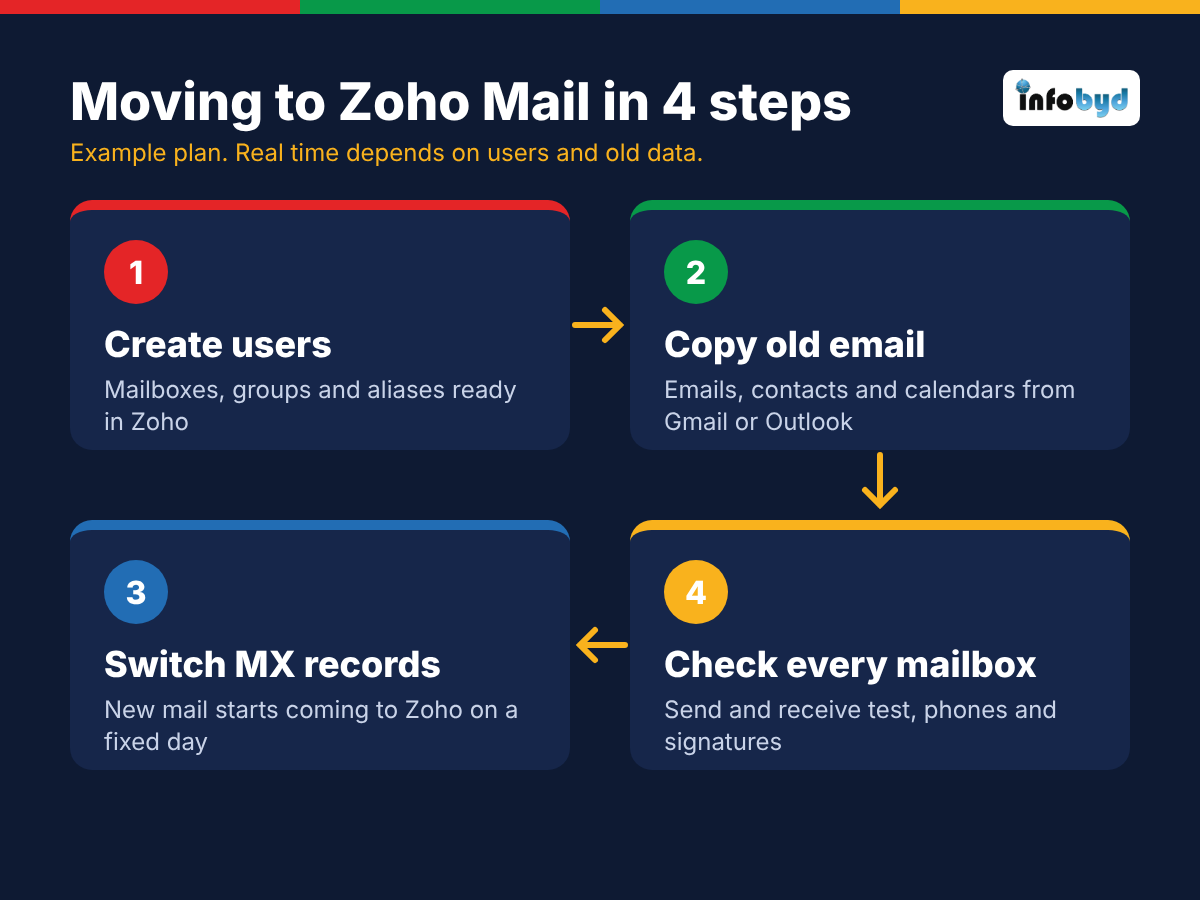
Moving from Gmail or Outlook: a simple 4-step plan
Here is an example of how a small team's move can be planned. The real time depends on the number of users and how much old data there is.
- Step 1: Create users. Every mailbox, group and alias is ready in Zoho before anything changes.
- Step 2: Copy old email. Emails, contacts and calendars are copied from Gmail, Google Workspace, Outlook or Microsoft 365. Users keep working in the old mail while this runs.
- Step 3: Switch MX records. On a fixed day, new mail starts coming to Zoho. A final copy picks up anything that arrived in the old account.
- Step 4: Check every mailbox. Send and receive tests for each user, phones connected, and signatures set.
If some people must move first, Zoho can deliver mail to both old and new servers for a short time (split delivery), so the team can move in groups.
Common mistakes to avoid
- Changing MX records before users are created, so mail bounces.
- Forgetting SPF, DKIM and DMARC, so your mail lands in spam.
- Paying for a user for every shared address instead of using groups and aliases.
- Not keeping the mailbox of an employee who leaves. The mail belongs to the company.
- No date fixed for the switch, so half the team is on the old mail and half on the new.
How Infobyd helps
As a Zoho Advanced Partner, we set up Zoho Mail and Zoho Workplace for teams in India and abroad: domain and DNS records, users and groups, migration from Gmail, Google Workspace, Outlook, Microsoft 365 or other mail servers, admin and security rules, and team training. See our Zoho Mail setup and migration page.
Frequently asked questions
Is Zoho Mail free for business?
Zoho has a free plan for up to 5 users on one domain, with 5 GB of mail storage per user, used through the web and mobile apps. It does not include IMAP, POP or ActiveSync, so you cannot connect it to Outlook or another mail app. From the 6th user, all users move to a paid plan. Zoho can change these limits, so check Zoho's pricing page before you decide.
Which Zoho Mail plan is best for a small business?
Mail Lite suits teams that mainly need email on their own domain. Mail Premium suits teams that need more storage and email retention (keeping old email safe). If you also want chat, file sharing and online meetings for the team, look at Zoho Workplace Standard or Professional.
Can I move my old emails from Gmail to Zoho Mail?
Yes. Emails, contacts and calendars can be moved from Gmail, Google Workspace, Outlook, Microsoft 365 and other IMAP mail servers. The usual way is to create users first, copy the old data, and then switch the domain's MX records so new mail starts arriving in Zoho.
Will we lose emails while moving to Zoho Mail?
Not if the move is planned. Old emails are copied before the switch, and the MX records are changed only after users are ready. After the switch, a final copy picks up any mail that arrived in the old account, and mail flow is tested for every user.
Planning to move your company email?
Book a free 30-minute call. Tell us how many users you have and where your email is today, and we will give you a clear written plan and quote.