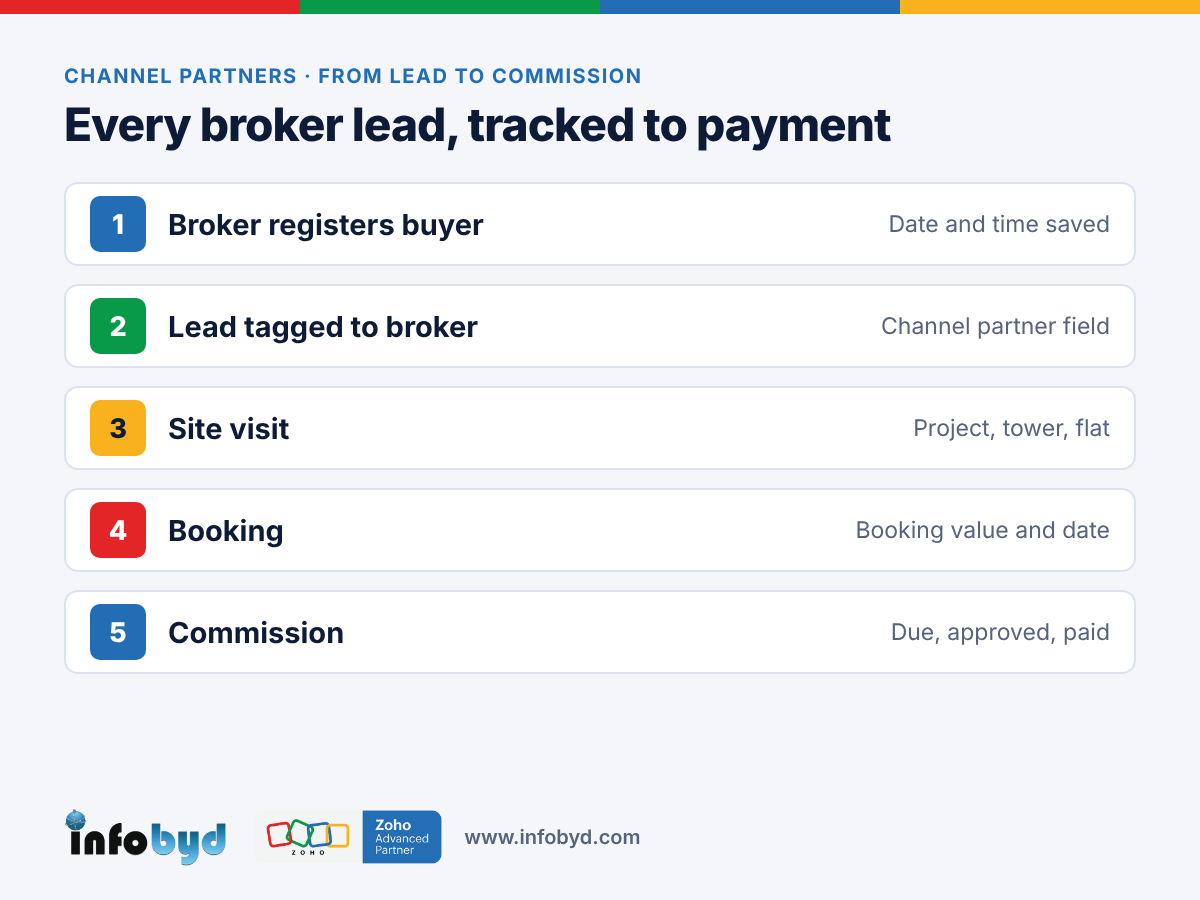
In Zoho CRM, each broker gets a record, and every lead they send is tagged to them. The first broker to register a buyer is saved with a date and time, so there is no argument later. Brokers can log in to a portal to add leads and see their status, and the commission is worked out from the booking value.
Setting up your sales pipeline first? Read Zoho CRM for real estate: from portal enquiry to booking.
Note: broker names, flats and numbers in this post are sample data.
Why broker sales get messy
A builder may work with 20, 50 or even more brokers across a city. Most of them share leads on WhatsApp, by call, or in an Excel sheet at month end. Common problems:
- Two brokers, one buyer. Both say they brought the client. Without a time-stamped record, the sales head has to decide, and one broker feels cheated.
- Broker leads go cold. Leads from brokers sit in a salesperson's phone and are not followed up like other leads.
- No view of broker performance. Management cannot see which broker brings site visits and bookings, and which only sends names.
- Late or wrong commission. Commission is worked out by hand, weeks after the booking. Mistakes and delays make good brokers move to other projects.
A clear process in CRM keeps brokers happy, because they can see that their leads are counted and paid fairly.
What to track for each broker and lead
| Where | Field | Why it matters |
|---|---|---|
| Broker record | Name, firm, phone, RERA agent number (if they have one), city | One clean list of all channel partners |
| Broker record | Agreed commission % or slab, payment terms | So commission is worked out the same way every time |
| Lead | Channel partner (lookup to the broker) | Every lead is tied to the broker who sent it |
| Lead | Registered on (date and time) | Settles "who came first" if two brokers send the same buyer |
| Lead / Deal | Site visit date, project, tower, flat | Shows real progress, not just names |
| Deal | Booking value, booking date | The base for commission |
| Commission | Amount, status (due, approved, paid), payment date | Brokers know when they will be paid |
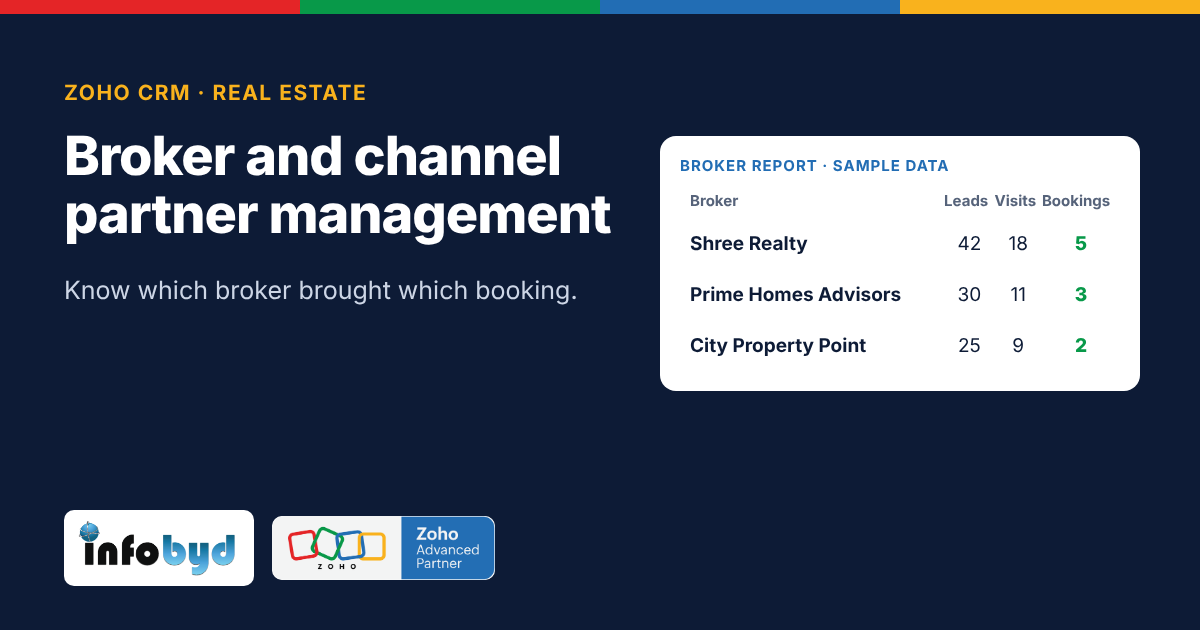
Sample broker report (example only):
| Broker | Leads | Site visits | Bookings |
|---|---|---|---|
| Shree Realty | 42 | 18 | 5 |
| Prime Homes Advisors | 30 | 11 | 3 |
| City Property Point | 25 | 9 | 2 |
Zoho CRM features for channel partners
Facts below were checked on Zoho's help pages on 5 Nov 2026. Some features depend on your Zoho CRM edition and need extra portal user licences, so check your plan.
| Need | Zoho CRM feature | Zoho source |
|---|---|---|
| Brokers add their own leads and see status | Portals let you give contacts, vendors or partners access to chosen parts of your CRM. A broker sees only the records you allow. Portal users may need extra licences. | Zoho CRM Help: Setting up portals |
| Broker list and commission records | Custom modules (your own tables in CRM), for example "Channel Partners" and "Commissions", linked to leads and deals | Built into Zoho CRM |
| Stop duplicate registrations | Duplicate check on phone and email when a lead is added, plus the "Registered on" date and time | Built into Zoho CRM |
| Follow the same steps every time | Blueprint can make sure a deal is not marked "Booked" until the broker and booking value are filled, and commission is approved before it is paid. Available from the Professional edition. | Zoho CRM Help: Blueprint |
| Broker performance | Reports and dashboards: leads, site visits and bookings per broker | Built into Zoho CRM |
Zoho CRM does not have a ready-made "broker commission" screen. We build it with a custom module and formula fields, so it follows your own commission rules. To make the steps fixed, see Blueprint in Zoho CRM.
How to set it up in 5 steps
- Write your broker rules. Who counts as the source if two brokers send the same buyer? How long is a registration valid (for example, 60 days)? What is the commission slab? Agree this with your sales head first.
- Create the broker list. Add a Channel Partners module with each broker's details and commission terms. Import your current broker list.
- Tag every lead. Add a Channel Partner field on leads and deals, and a "Registered on" date and time. Turn on the duplicate check for phone numbers.
- Open a broker portal. Invite active brokers to add leads and see their status (new, site visit done, booked). Show them only their own leads.
- Automate commission. When a deal is booked, create a commission record with the amount worked out from the booking value. Send it for approval, then mark it paid with the date.
Share the rules with brokers in writing. Clear rules, shown in the portal, stop most disputes before they start.
How Infobyd helps
Infobyd is a Zoho Advanced Partner. For builders who sell through brokers we:
- Help you write clear broker and commission rules
- Set up the Channel Partners and Commissions modules in Zoho CRM
- Build a broker portal so partners can add leads and track them
- Create broker performance dashboards for management
- Train your channel partner team, and support you after go-live
Learn more on our Zoho CRM page and our Zoho CRM for real estate page.
Frequently asked questions
How do we decide which broker gets credit for a buyer?
Set a rule first, for example "the first broker to register the buyer's phone number gets credit for 60 days". Zoho CRM saves the date and time of each registration and can warn about duplicates, so the rule is easy to apply.
Can brokers log in and add leads themselves?
Yes. Zoho CRM portals let outside partners log in and work with chosen records. Each broker sees only their own leads. Portal users may need extra licences, so check your plan.
Can Zoho CRM work out broker commission?
Yes, with a simple setup. A custom Commissions module can calculate the amount from the booking value and the broker's slab, and track it from due to paid.
Can we see which brokers bring real bookings?
Yes. A broker report can show leads, site visits and bookings for each broker, so you can reward the best partners.
Do we need a separate app for brokers?
Not usually. The CRM portal covers most needs. If you want extra features, such as a live flat availability view for brokers, a Zoho Creator app can be added.
Is this only for big builders?
No. Even a builder with 10 to 15 regular brokers gains from clear tagging and on-time commission.